Main Body
Chapter 12 • Forms
HTML forms provide a way for readers to submit information about themselves and what they are interested in. Forms can be useful for readers to contact you.
Following is a description of some of the most useful form tags. To see the tags in action, visit the GRC 365 “Demo Site” document, “Contact.” You can read the underlying code with your browser’s Web Inspector.
A more thorough explanation of forms and their tags is given on the W3Schools website.
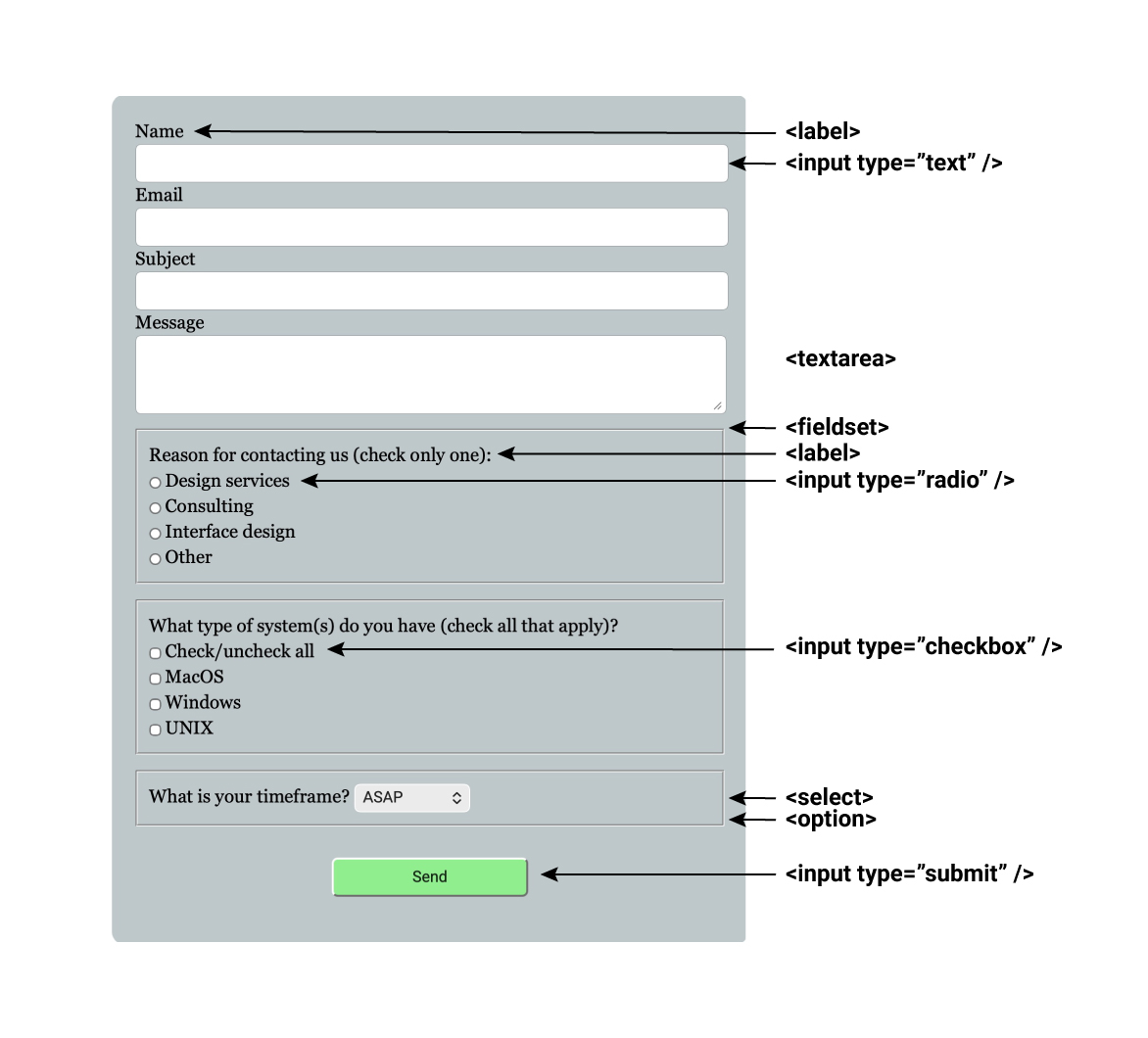
Form Elements
Form Tag
The form tag (opening/closing) provides a framework for the form. The opening form tag should have an “action” section and a “post” method. The action is what takes place when the reader hits the Submit button. Collecting form data requires a program and database on the server hosting the form page. Several free services are available that collect form data and email it to the host, including web3forms.com and formsubmit.co.
Input Tag
The input tag (self-closing) should have an associated type, which can include “text” for single lines of text; “radio” for radio buttons, in which readers can only select one alternative; “checkbox” for check boxes, of which the readers can select multiple alternatives; and the “submit” button.
Textarea Tag
The <textarea> tag (opening/closing) is for multiple lines of text, such as a description or message from a reader. The dimensions of the textarea can be specified in rows and columns or as dimensions.
Select Tag
The <select> tag (opening/closing) creates a dropdown menu of <option> tags.
Accessory Tags
The following tags are useful in organizing other tags and groups thereof:
• <label> (opening/closing) — provides a description of the field
• <fieldset> (opening/closing) — draws a box around a group of tags
Design Ideas for Forms
Some styles that can make forms more attractive, reader-friendly, and functional include:
• center the form in the page (the <form> tag is block-level and can be centered with margin: 0 auto)
• color the background of the form
• round the corners of the form