Main Body
Chapter 5 • Images
Image Resolution
With photographic images on the web, designers walk a fine line between image quality and file size. Digital bitmapped photos are made up of a matrix of microscopic colored squares, or picture elements (pixels).
Bitmapped images have larger file sizes than vector graphic illustrations and are “use-specific,” meaning their resolution should be set correctly for the intended reproduction size. Excessively high resolutions and large photos reduce download speed, while too-small images may show “pixelization” in which individual pixels can be seen and create a “stair-stepped” effect.
When thinking about the appropriate resolution of bitmapped images, consider the reproduction size you want to use. E.g., if you have a fixed-width page, 1024px wide, a good idea is to set the resolution of full-width images to double that number, or 2048px, to leave room for future enlargement. Likewise a half-width image would be 512px wide and could be sized to 1024px width.
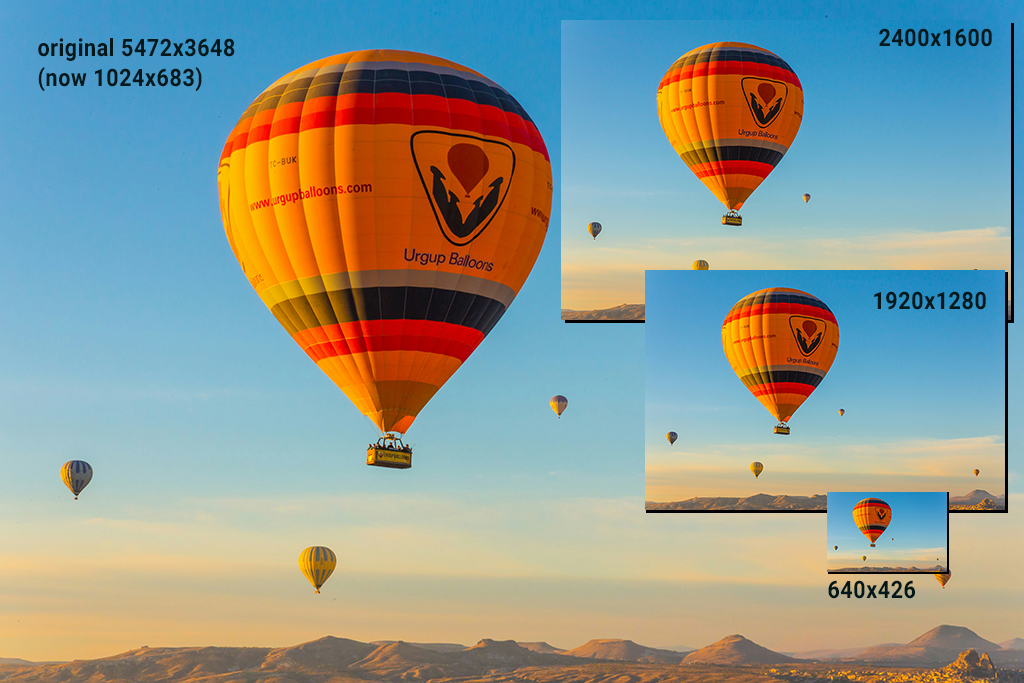
| Resolutions and File Sizes for the Balloon Image | |
|---|---|
| resolution | file size |
| 5472×3648 | 1.7 MB |
| 2400×1600 | 291 K |
| 1920×1280 | 194 K |
| 640×426 | 37 K |
Procedure
Assume you want a banner image that’s 1024px wide. You want an image size that’s 1024 to 2048px wide, depending on whether you want to leave open the option to reproduce the image at a larger size. You download an image or take a photo similar to the balloon image above, which originally was 5472px wide—way too big for its intended use.
- Open the image in Photoshop, Preview, or other image-editing program.
- Set the resolution to 1024 or 2048px.
- Resave in JPEG or PNG (for transparency) format.
Image Formats for the Web
Images for the web should be in a compressed format such as JPG, PNG, or GIF. Three key considerations are:
- the bit depth, or number of colors, that the image can address. Eight-bit images can address 256 colors (28), while 16-bits support 16.7 million colors.
- whether transparency is required, e.g., to delete the background
- color mode should be RGB or grayscale, not CMYK or indexed color
| Image Format | Transparency | Comments |
| JPG | no | compressed format for the web |
| PNG 8- or 16-bit | yes | compressed format, supports transparency |
| GIF 8-bit | yes | compressed format, also supports transparency |
| TIFF | no | uncompressed format for printing |
| PSD | yes | uncompressed format for printing |
Reference Document
How-to Images: rich-adams.net > Completed Tutorials > Home > How-to Images (link at bottom of page)